Configure ANAF application modes
An application that uses the RO E-Factura Service or the RO E-Transport Service has an operating mode for each service. The e-Factura mode determines whether the application only sends invoices or also imports the invoices it receives from suppliers. The e-Transport mode determines whether the application acts as a declarer, a carrier, or both.
A mode applies to the whole application, across all of its tenants and ANAF authorizations. The e-Factura and e-Transport modes are independent of each other.
You can set the modes either from the SBS Console or from GraphQL. In either case, your user account (or the account access key, if you are doing this through the Account API) must have the permission to run the updateApp mutation of the Account API.
Modes
E-Factura
| Console label | API value | Effect |
|---|---|---|
| Send and receive | SEND_RECEIVE |
The application sends invoices and imports the invoices it receives from suppliers. This is the default. |
| Send only | SEND_ONLY |
The application sends invoices only. Invoices from suppliers are not imported. |
An application with no e-Factura mode set works as Send and receive.
What “Send only” changes
While the application is in Send only mode, invoices from suppliers are not imported: inboundInvoices and storedMessages do not return them, and no NEW_INBOUND_INVOICE webhook is sent for them.
This is the only difference. Everything else works exactly as in Send and receive mode, including:
- Self-invoices (autofactura) are imported, and each sends a
NEW_INBOUND_INVOICEwebhook. They are the only invoices that send this webhook in Send only mode. - Buyer notifications on invoices the application sent still arrive, and each sends an
INVOICE_NOTIFICATION_RECEIVEDwebhook. - Creating, sending, and uploading invoices.
- Reading the inbound invoices imported before the switch, and responding to them with
notifyInvoiceSender. - The
messagesquery, which reads from ANAF and still lists received invoices (typeFACTURA PRIMITA).
Switching modes
A mode change applies from the next retrieval from ANAF, within 30 minutes. For an invoice that ANAF listed in the 30 minutes before the change, either mode may apply. A mode change never alters or hides the invoices already imported.
When you switch from Send only back to Send and receive, invoices from suppliers that ANAF created less than 7 days before the switch are imported within 26 hours, and their NEW_INBOUND_INVOICE webhooks are sent. Older invoices are not guaranteed to be imported. Invoices that ANAF no longer keeps (after approximately 60 days) are not imported.
E-Transport
| Console label | API value | Effect |
|---|---|---|
| Declarer | DECLARER |
The application obtains and manages its own transport declarations. It does not read or amend declarations assigned to it as a carrier. |
| Carrier | CARRIER |
The application manages declarations assigned to it as a carrier. It does not perform declarer operations. |
| All | ALL |
The application performs both declarer and carrier operations. This is the default. |
Caution
A mode change affects all users of the application with immediate effect:
- Send only stops importing invoices from suppliers. When you switch back to Send and receive, only the invoices from the last 7 days are guaranteed to be imported. See Switching modes.
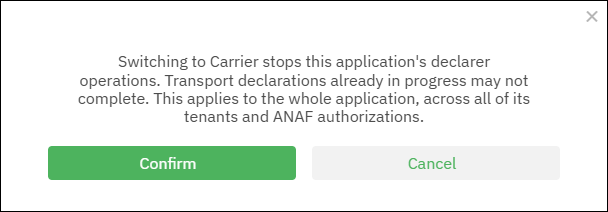
- Carrier stops the application’s declarer operations. Transport declarations already in progress may not complete.
Web UI
To set your app’s e-Factura or e-Transport mode:
-
Sign in to the SBS Console.
-
In the left-hand side navigation menu, click Applications.
-
Click the application for which you would like to set the mode.
-
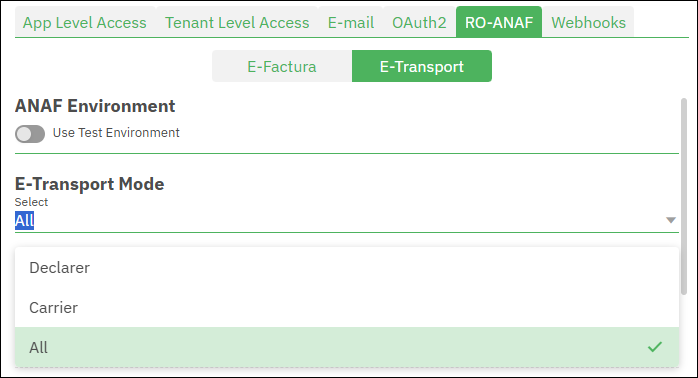
Click the RO-ANAF tab, and then click E-Factura or E-Transport, as applicable.
-
Under E-Factura Mode (or E-Transport Mode), select the mode from the list. The list shows the application’s current mode.
-
In the confirmation dialog box, read the description of the change, and then click Confirm. To keep the current mode, click Cancel.
GraphQL
To set your app’s e-Factura or e-Transport mode:
- Sign in to the SBS Console.
- Click the GraphQL tab.
- Run the
updateAppmutation and supply a value toroAnafEfacturaMode,roAnafEtransportMode, or both. For example, the mutation listed below sets the e-Factura mode to Send only and the e-Transport mode to Declarer:
mutation updateApp($id:ID!,$input:UpdateAppInput!) {
  updateApp(id:$id, input:$input) {
    id
    name
    roAnafEfacturaMode
    roAnafEtransportMode
  }
}
{
  "id": "YOUR_APPLICATION_ID",
  "input": {
    "roAnafEfacturaMode": "SEND_ONLY",
    "roAnafEtransportMode": "DECLARER"
  }
}